Turn a few words into your next image. Create from text or refine a reference with Flux 2 Klein 4B and 9B.
Prepare your prompt here. Sign in to generate in the workspace.
Text to image & editing
4B from 2 credits
No installation
A little inspiration
Image ideas to try with Flux 2 Klein
Explore a visual direction, then make it your own. These prompt ideas are starting points for your next image.
Sculptural portraits
01
Prompt idea
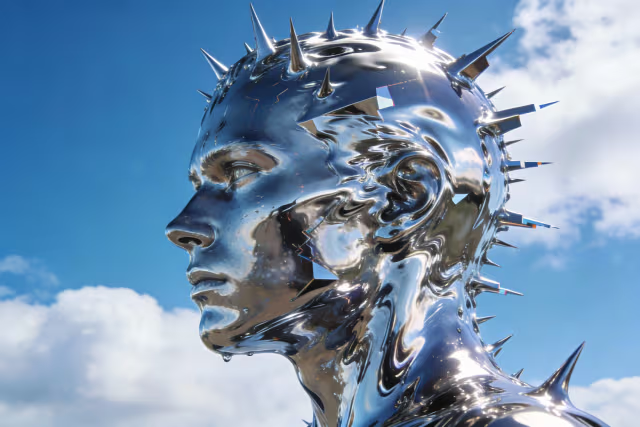
A reflective chrome head with sculpted spikes, clear blue sky, soft clouds, dramatic side lighting, close-up portrait.
Watercolor illustrations
02
Prompt idea
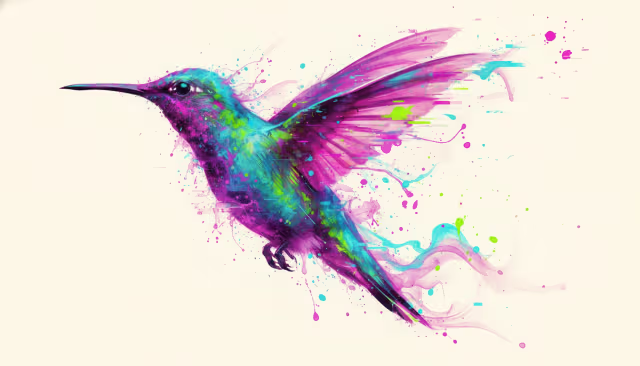
A hummingbird in flight, vivid magenta and teal watercolor, expressive brushstrokes, splashes of color, warm ivory paper.
Playful 3D concepts
03
Prompt idea
A floating pink torus made of tiny particles around a glowing orange center, playful 3D art, soft studio light, pale blue background.
Product photography
04
Prompt idea
A tall glass of sparkling amber citrus drink, bubbles rising through the liquid, dramatic backlighting, neutral studio background, product photography.
The essentials
What is Flux 2 Klein?
Flux 2 Klein is an image generation and editing model family developed by Black Forest Labs. This independent website brings its 4B and 9B variants to a browser workspace, where you can create an image from text or use a reference image to guide an edit.
Input
Text or reference images
Models
Flux 2 Klein 4B & 9B
Text to image
2 credits (4B) / 4 credits (9B)
Image editing
4 credits (4B) / 6 credits (9B)
Model inference benchmarks are not a delivery-time promise. Queue length, image size and the selected model affect how long a request takes.
From idea to image
How to use Flux 2 Klein
01
Describe the image
Start with the subject, then add the setting, lighting and visual style. Use a prompt idea above if you need a starting point. Upload a reference when you want to edit an existing image.
02
Choose your model
Pick 4B for lower-credit exploration or 9B for a higher-detail direction. Set the aspect ratio to suit your layout, then continue to the workspace to review the settings and credit cost.
03
Generate, refine, download
Sign in and submit the request from the workspace. Review the result, adjust one part of your prompt at a time, and download the image you want to keep.
A canvas for your ideas
Images for the work you do
Product & marketing
Find the right light for your product.
Explore backgrounds, surfaces and lighting before committing to a campaign direction. Describe the materials and camera angle, or bring a reference image when the product's appearance matters.
Useful for product concepts, campaign moodboards and social visuals. Check logos, labels and fine details before publishing.
Illustration & concept art
Give a rough idea a visual direction.
Try watercolor, sculptural forms or a more cinematic look from the same starting idea. Change the palette, composition or medium to explore alternatives without rebuilding a scene from scratch.
Useful for editorial illustrations, character concepts and early creative studies. Be specific about what should stay consistent between iterations.
Choose your starting point
Flux 2 Klein 4B or 9B?
The two variants share a text-and-image workflow. Choose based on your credit budget and the kind of detail you want to explore.
A few practical details about using Flux 2 Klein here.
Can I try the tool before signing in?
You can write a prompt, select a model and choose an aspect ratio on this page. Generation takes place in the workspace and requires sign-in and sufficient credits. Check the workspace for the current balance and any available offers.
What is the difference between 4B and 9B?
4B uses fewer credits and is a useful starting point for trying ideas. 9B is the larger variant for exploring more detailed results. Text-to-image requests cost 2 credits with 4B or 4 credits with 9B; editing costs 4 or 6 credits respectively.
Can I edit an image I already have?
Yes. Add a reference image to the composer and describe the change you want. Your prompt and image are carried into the workspace. State both what should change and what should stay the same; results still need review.
Will my image be ready in less than a second?
Not necessarily. Black Forest Labs describes sub-second model inference under specific conditions. A hosted request also includes queueing, processing and delivery, so actual waiting time varies. The workspace shows the request status.
Can I use images commercially?
Usage depends on the selected model's license, the service terms and rights in your inputs. The 4B model is released under Apache 2.0; 9B uses different license terms. Review the applicable terms before commercial use, and check outputs for protected content.
Is this the official Black Forest Labs website?
No. flux2klein.ai is an independently operated service that provides access to the Flux 2 Klein model family. It is not affiliated with, endorsed by or sponsored by Black Forest Labs.